
Artificial intelligence has completely changed the way videos are created. What once required cameras, actors, expensive equipment, editing software, and hours of post-production can now be produced with a simple text prompt, reference image, or short script.
In 2026, AI video generators have moved beyond basic experiments. Creators, marketers, YouTubers, filmmakers, agencies, and businesses are using them for advertisements, social media videos, product demonstrations, cinematic scenes, educational content, and creative storytelling.
But with so many tools available, choosing the right one can be difficult.
So, what are the best AI video generators in 2026?
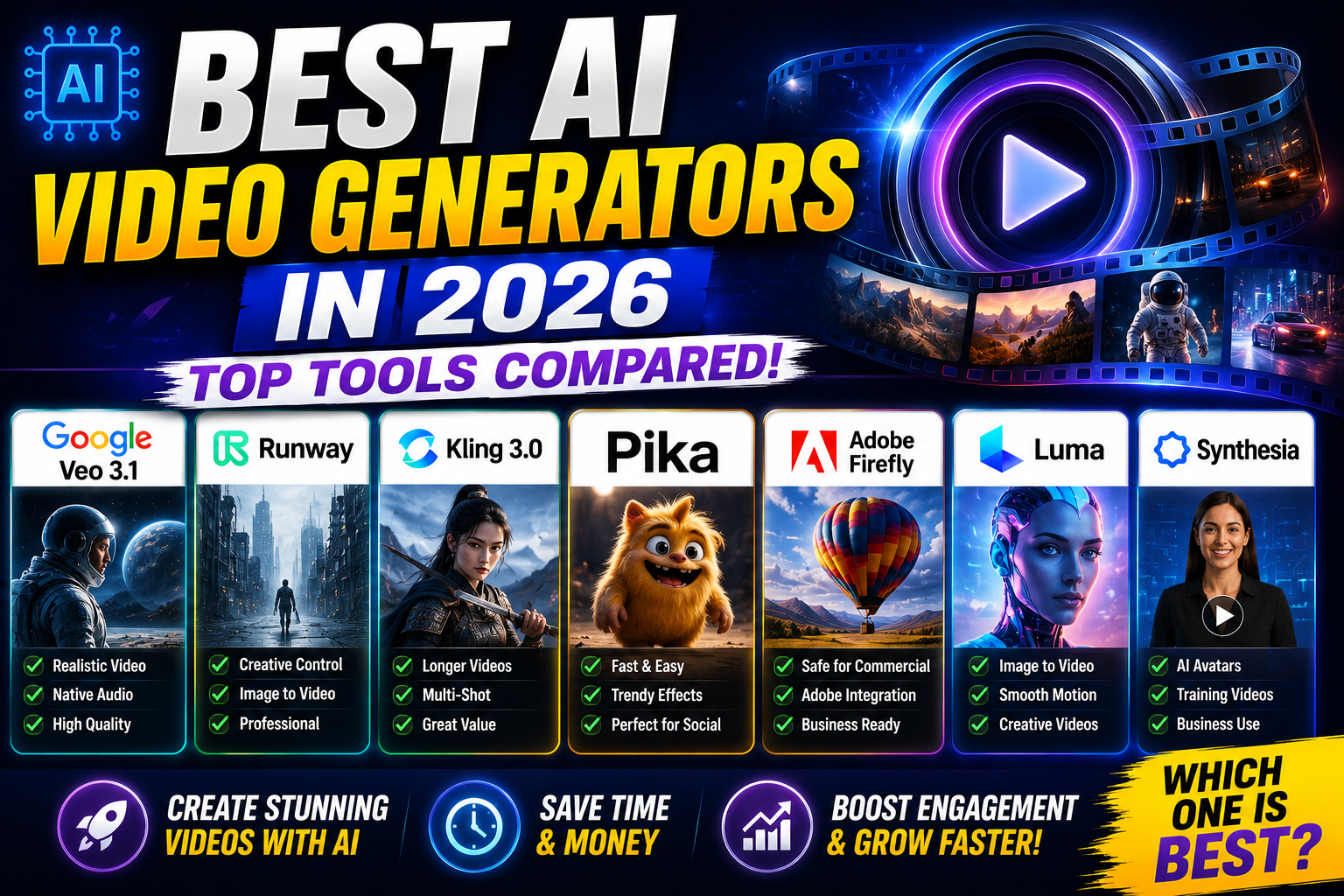
The answer depends on what you need. Google Veo 3.1 is frequently positioned as an all-round choice for realism and native audio, Runway is strong for creative control and professional workflows, Kling is attractive for value and longer generations, while Pika focuses heavily on fast social content. Recent 2026 comparisons consistently identify these tools among the major options.
What Is an AI Video Generator?
An AI video generator is a tool that uses artificial intelligence to create or transform video content.
Depending on the platform, you may be able to generate videos from:
- Text prompts
- Images
- Existing videos
- Scripts
- Product photographs
- Storyboards
- Reference characters
- Audio
- Other creative assets
For example, you could enter a prompt describing a futuristic city at night and receive a short cinematic video.
More advanced tools can generate dialogue, sound effects, camera movements, character actions, and multiple shots.
The technology is becoming particularly useful for businesses because it can reduce the time and resources required to produce video marketing content.
Best AI Video Generators in 2026: Quick Comparison
| AI Video Generator | Best For | Key Strength |
|---|---|---|
| Google Veo 3.1 | Realistic videos | Native audio and strong realism |
| Runway Gen-4.5 | Professional creators | Creative control and editing |
| Kling 3.0 | Value and longer clips | Motion and multi-shot generation |
| Pika | Social media | Fast, creative effects |
| Adobe Firefly | Businesses | Creative workflow integration |
| Luma | Creative video | Video transformation and motion |
| Synthesia | Business videos | AI presenters and training |
The best choice depends on whether your priority is cinematic quality, social media content, business communication, or professional creative control.
1. Google Veo 3.1
Google’s Veo 3.1 has become one of the most prominent AI video models in 2026.
Its major advantage is realism combined with native audio capabilities. Recent comparisons describe Veo 3.1 as a strong all-round option, particularly for realistic scenes, synchronized dialogue, and narrative content.
This makes Veo especially interesting for creators who want videos that feel closer to professionally produced footage.
Best Features
- High-quality video generation
- Strong prompt understanding
- Native audio
- Realistic motion
- Image-to-video capabilities
- Creative storytelling
- Integration across Google’s AI ecosystem
Best For
Veo 3.1 is a strong choice for:
- YouTube creators
- Filmmakers
- Advertisers
- Storytelling
- Product videos
- Cinematic content
One limitation is that individual generated clips can still be relatively short, meaning longer stories may require multiple generations and editing.
Verdict: One of the strongest choices for realism and audio.
2. Runway Gen-4.5
Runway is one of the most established names in AI video creation.
Its biggest strength is creative control.
Rather than focusing only on generating a video from a sentence, Runway provides a broader creative environment where users can generate, modify, and develop visual content.
Recent 2026 comparisons highlight Runway’s professional-oriented controls, including camera direction, reference-based generation, character consistency, and editing workflows.
Best Features
- Text-to-video
- Image-to-video
- Creative controls
- Reference images
- Character consistency
- Camera movement
- Video editing
- Professional workflows
Best For
Runway is particularly useful for:
- Filmmakers
- Agencies
- Marketing teams
- Professional creators
- Commercial videos
- Cinematic projects
If you want more control over the creative process rather than simply pressing “generate,” Runway is an excellent option.
Verdict: One of the best AI video tools for professional creative control.
3. Kling 3.0
Kling has become a major competitor in AI video generation.
Its appeal comes from a combination of motion quality, multi-shot capabilities, audio, and relatively strong value.
Recent 2026 comparisons highlight Kling’s ability to generate longer clips and its multi-shot storytelling capabilities.
Best Features
- Text-to-video
- Image-to-video
- Multi-shot storytelling
- Native audio
- Motion control
- Character consistency
- Longer video generation
- High-resolution output
Best For
Kling is suitable for:
- Social media creators
- Short films
- Marketing videos
- Storytelling
- Character-based content
- High-volume creators
For creators who need more footage from each generation, Kling can be particularly attractive.
Verdict: A strong option for value, motion, and longer-form AI video generation.
4. Pika
Pika takes a more social-media-friendly approach to AI video creation.
Instead of focusing entirely on cinematic filmmaking, it provides creative effects and quick generation features that are useful for short-form content.
Recent comparisons identify Pika as a strong choice for social creators and fast experimentation.
Best For
Pika works well for:
- Instagram Reels
- YouTube Shorts
- Social advertisements
- Memes
- Creative effects
- Quick visual experiments
Its simpler creative workflow can make it appealing to beginners who want to experiment without learning a complex professional editing system.
Verdict: Great for fast and creative social media videos.
5. Adobe Firefly
Adobe Firefly is especially interesting for businesses and professional creative teams because it fits into Adobe’s broader creative ecosystem.
Instead of treating AI generation as a completely separate process, Firefly can become part of an existing workflow involving design, image creation, video editing, and other creative tasks.
Adobe is also emphasizing commercially safer AI workflows for professional users.
Best For
Adobe Firefly is a strong option for:
- Marketing agencies
- Businesses
- Designers
- Advertising teams
- Creative professionals
- Existing Adobe users
If your company already uses Adobe Creative Cloud, Firefly can be particularly convenient.
Verdict: A strong choice for business-focused creative workflows.
6. Luma
Luma is another notable name in AI video generation, particularly for transforming and animating visual content.
It can be useful when you want to take an image or existing visual concept and turn it into moving footage.
Recent 2026 comparisons highlight Luma among the important tools for video transformation and creative production.
Best For
- Image-to-video
- Creative storytelling
- Product visuals
- Experimental videos
- Marketing content
- Cinematic concepts
Verdict: Worth considering for creators who prioritize visual transformation and experimentation.
7. Synthesia
Not every AI video generator is designed to create cinematic scenes.
Synthesia focuses more on AI presenter and business videos.
Businesses can use AI presenters to create training videos, internal communications, onboarding material, educational content, and corporate presentations.
This makes it different from tools such as Veo, Kling, and Runway.
Best For
- Employee training
- Corporate communication
- Tutorials
- Online courses
- Product education
- Business presentations
If you need a virtual presenter rather than a cinematic scene, Synthesia may be a better fit.
Which AI Video Generator Has the Best Quality?
There is no permanent winner because AI video models are improving rapidly.
Current 2026 comparisons frequently put Veo 3.1, Kling 3.0, and Runway near the top, but their strengths differ. Veo is frequently praised for realism and native audio, Kling for motion and value, and Runway for creative control.
The right question is therefore not:
“Which AI video generator is number one?”
Instead, ask:
“Which AI video generator is best for the type of video I want to create?”
Which AI Video Generator Is Best for YouTube?
For YouTube creators, Google Veo can be attractive for realistic storytelling and visual sequences.
Runway is better suited to creators who want greater creative control and editing capabilities.
Kling can be useful for creators producing frequent AI-generated scenes or longer sequences.
For YouTube Shorts, Pika may be attractive because of its fast, social-focused creative features.
A practical workflow could even combine multiple tools.
For example:
Script → AI video generation → AI voiceover → Editing → Captions → Thumbnail → YouTube
You don’t necessarily need one platform to perform every task.
Which AI Video Generator Is Best for Marketing?
For marketing, the best tool depends on the campaign.
Product advertisements
Veo, Runway, and Kling can be useful for visually rich advertisements.
Social media content
Pika and Kling can be useful for fast creative experiments.
Corporate training
Synthesia can be more appropriate.
Professional agency workflows
Runway and Adobe Firefly can fit more naturally into professional creative pipelines.
Multilingual campaigns
AI voice, dubbing, and translation tools can be combined with video generators to create localized versions.
Are AI Video Generators Free?
Many AI video platforms offer free trials, limited credits, or restricted free access.
However, serious video production usually involves paid plans or credit-based systems.
The cost can vary significantly depending on:
- Resolution
- Video duration
- Number of generations
- Model used
- Commercial usage
- Priority processing
- Editing features
Recent 2026 comparisons show entry pricing and credit structures vary considerably between major platforms, so creators should compare actual usage costs rather than looking only at the advertised monthly subscription.
What Are the Limitations of AI Video Generators?
AI video has improved dramatically, but it is not perfect.
Common problems can still include:
- Inconsistent characters
- Incorrect text
- Strange hands or objects
- Physics mistakes
- Unnatural movement
- Audio inconsistencies
- Continuity problems
- Limited control over long scenes
Research published in 2026 also shows that current video models can behave inconsistently across different physical scenes, reinforcing the need for human review and quality control.
For important commercial content, don’t publish the first generation without checking it carefully.
How to Get Better Results From AI Video Generators
The quality of your prompt can make a major difference.
Instead of writing:
“A car driving through a city.”
Try something more specific:
“A futuristic electric sports car driving through a rain-soaked Mumbai street at night, cinematic tracking shot, realistic reflections, shallow depth of field, dramatic lighting, high-detail commercial style.”
Include details such as:
- Subject
- Location
- Camera movement
- Lighting
- Mood
- Visual style
- Composition
- Action
- Duration
- Aspect ratio
The more clearly you communicate the creative goal, the easier it becomes to produce a useful result.
The Future of AI Video Generation
AI video generation is moving quickly toward complete creative workflows.
Instead of simply generating isolated clips, future tools are increasingly focused on:
- Character consistency
- Multi-shot storytelling
- Native audio
- Video editing
- Reference images
- Longer sequences
- Realistic physics
- Personalized content
- Automated production
The market is also changing quickly. OpenAI’s Sora consumer experience was discontinued in April 2026, while competitors such as Google, Runway, Kling, and others continued expanding their capabilities.
This shows why creators should avoid building an entire workflow around one AI model.
Final Verdict: Best AI Video Generators in 2026
The best AI video generator in 2026 depends on your specific needs.
- Google Veo 3.1: Best for realistic video and native audio
- Runway Gen-4.5: Best for professional creative control
- Kling 3.0: Best for value, motion, and longer generations
- Pika: Best for social media creativity
- Adobe Firefly: Best for business and Adobe workflows
- Luma: Best for visual transformation
- Synthesia: Best for AI presenter and business videos
For beginners, start with one tool and learn how to write strong prompts before subscribing to multiple platforms.
For professionals, using several specialized tools may produce better results than relying on one generator.
Most importantly, remember that AI video generation is a tool—not a replacement for creative strategy. The strongest videos still need a good idea, compelling storytelling, clear visual direction, strong editing, and an understanding of the target audience.
In 2026, the biggest advantage isn’t simply having access to the most powerful AI video generator. It’s knowing which tool to use, when to use it, and how to turn its output into content people actually want to watch.