
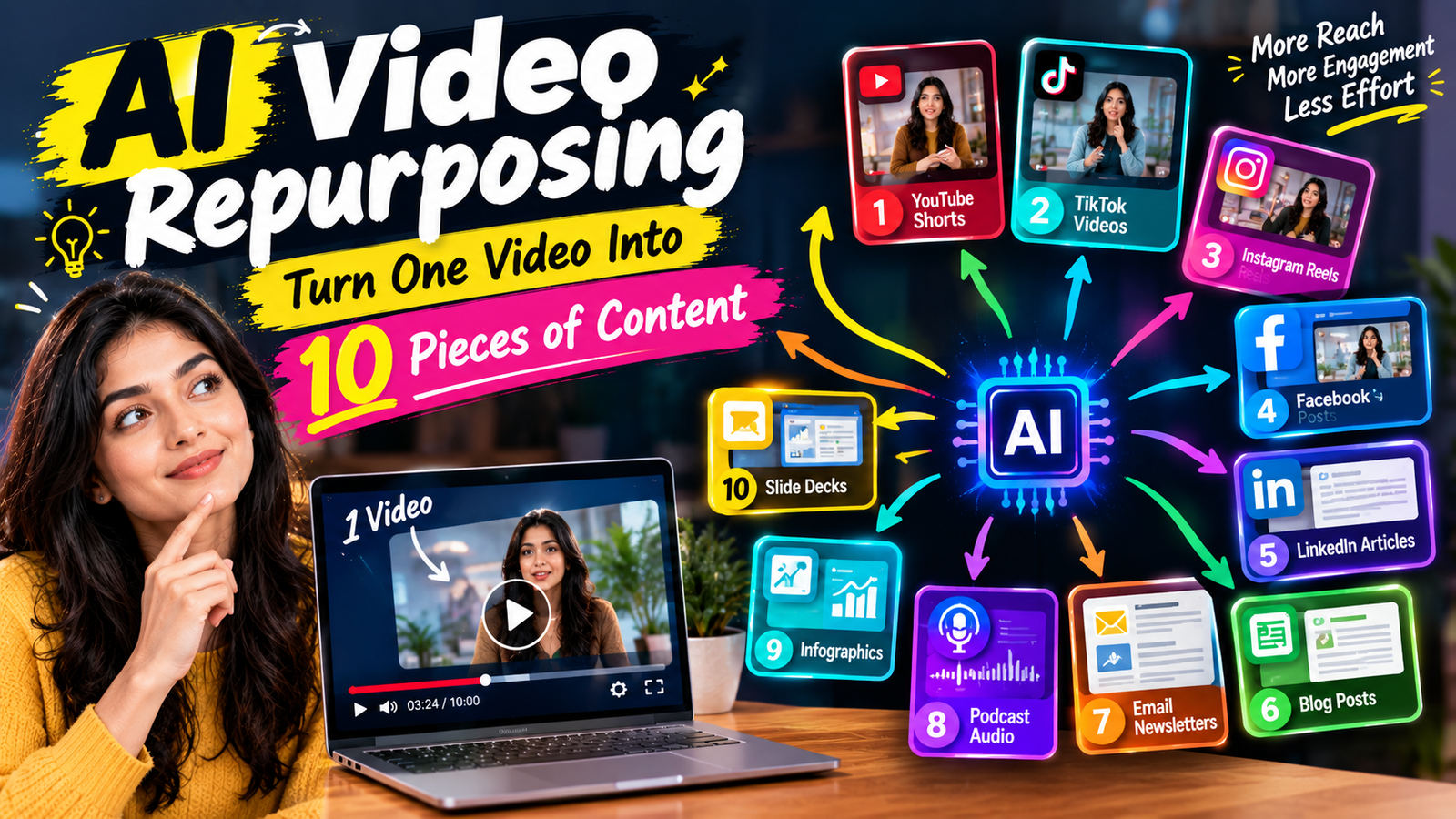
AI video repurposing is changing the way brands, creators, and marketers produce content in 2026. Instead of creating every social media post, Reel, Short, article, and quote graphic from scratch, marketers can start with one strong video and turn it into multiple pieces of content.
Imagine recording a 20-minute podcast, interview, webinar, tutorial, or product presentation. Traditionally, you might publish that video once and move on to the next project. With AI-powered tools, the same video can become several short clips, social posts, captions, blog content, email ideas, and more.
This approach saves time while helping brands stay consistent across multiple platforms.
So, how does AI video repurposing work, and how can you turn one video into 10 useful pieces of content?
Let’s break it down.
What Is AI Video Repurposing?
AI video repurposing means using artificial intelligence to transform an existing video into different content formats.
AI tools can analyze a video, identify important sections, transcribe conversations, create captions, and suggest shorter clips.
Depending on the tool and workflow, one long-form video can become content for:
- YouTube
- TikTok
- X
- Blogs
- Email newsletters
- Podcasts
The key idea is simple: create once, distribute many times.
Instead of constantly searching for new ideas, marketers can get more value from content they have already created.
Why AI Video Repurposing Matters in 2026
Content marketing can be demanding.
Brands are expected to publish regularly across multiple platforms. At the same time, audiences consume content in different ways.
Some people prefer long YouTube videos. Others want short Reels. Some enjoy reading blog posts, while others prefer newsletters or podcasts.
Creating completely different content for every platform can quickly become expensive and exhausting.
AI video repurposing helps solve this problem.
A single piece of high-quality content can become the foundation for an entire content campaign.
How to Turn One Video Into 10 Pieces of Content
Here are 10 practical ways to repurpose one video using AI-assisted workflows.
1. Create Short-Form Video Clips
The first and easiest option is turning your long video into short clips.
AI can analyze a long recording and identify sections that may work independently.
For example, a 30-minute interview could produce five or six short videos.
Each clip can focus on one useful idea, surprising statement, question, or story.
These clips can then be adapted for Instagram Reels, YouTube Shorts, TikTok, and other short-form platforms.
The important part is to make each clip understandable on its own.
2. Generate YouTube Shorts
Your long-form YouTube video can also become several Shorts.
Suppose you publish a 20-minute video called “How AI Is Changing Marketing.”
That single video could contain several smaller topics:
- AI content creation
- AI video editing
- AI personalization
- AI marketing automation
- Common AI mistakes
Each topic can become a separate Short.
AI can help locate these moments and prepare them for vertical video formats.
3. Turn the Video Into a Blog Article
A long video can also become a written article.
AI transcription tools can convert speech into text. You can then use that transcript as a starting point for a structured blog post.
For example, a 30-minute webinar could become a 1,500-word SEO article.
However, avoid publishing raw AI transcripts.
A better workflow is to use the transcript as source material and then edit it for:
- Search intent
- Headings
- Readability
- Keywords
- Examples
- Internal links
- SEO structure
This creates a much more useful article.
4. Create LinkedIn Posts
One video can produce multiple LinkedIn posts.
Look for strong insights, statistics, lessons, questions, or opinions from the original recording.
For example, a marketing interview could produce a LinkedIn post about three common video marketing mistakes.
Another section could become a post about AI automation.
A third could focus on content strategy.
This turns one conversation into several professional content opportunities.
5. Create Instagram Carousel Ideas
Not every piece of content needs to remain a video.
AI can extract the main points from your recording and turn them into carousel concepts.
Imagine your video discusses “5 Ways to Improve Social Media Videos.”
Those five points can become a carousel:
Slide 1: 5 Ways to Improve Your Videos
Slide 2: Start With a Strong Hook
Slide 3: Keep the Message Clear
Slide 4: Add Captions
Slide 5: Use Visual Changes
Slide 6: End With a Clear CTA
The original video becomes the research source for another content format.
6. Create an Email Newsletter
Your video can also become an email.
Extract the most useful lesson from the recording and turn it into a short newsletter.
For example, if your video explains AI video marketing, your email could focus on one practical AI strategy.
You can then include a link directing readers to the complete video.
This creates a content loop:
Video → Email → Video
Your audience gets another way to discover the original content.
7. Turn the Video Into a Podcast Episode
If your video is primarily a conversation, interview, discussion, or educational presentation, the audio can become a podcast episode.
AI tools can help separate the audio from the video, clean up recordings, generate transcripts, and create show notes.
You can also create a short podcast introduction and description based on the original content.
This allows the same conversation to reach people who prefer listening instead of watching.
8. Create Quote Graphics
Strong statements from a video can become visual quotes.
Suppose a speaker says:
“Great content doesn’t need to be everywhere. It needs to be useful somewhere.”
That statement could become a branded social graphic.
AI can help identify potential quotes from a transcript.
The marketing team can then select the strongest ones and turn them into visual posts.
Quote content is particularly useful when a video contains interviews or expert discussions.
9. Create an FAQ From the Video
Educational videos often answer multiple questions.
AI can identify those questions and organize them into an FAQ.
For example, a video about AI video marketing might answer:
- What is AI video marketing?
- How does AI editing work?
- Can AI create captions?
- Should brands use AI avatars?
- How can marketers repurpose videos?
Those questions can become an FAQ section on a website or blog.
This can also help brands discover future content ideas.
10. Create Social Media Captions
Finally, one video can generate multiple social media captions.
Instead of writing a caption from scratch every time you publish a clip, AI can create several starting points.
You could request:
- Short Instagram captions
- LinkedIn captions
- YouTube descriptions
- TikTok captions
- Promotional copy
- Educational captions
Human editing is still important because the final caption should match the brand’s tone.
The Best AI Video Repurposing Workflow
A simple workflow can make the process easier.
Step 1: Start With One Strong Video
Choose a valuable long-form video.
It could be a webinar, interview, podcast, tutorial, product demo, or educational video.
Step 2: Transcribe the Video
Use an AI transcription tool to create a searchable text version.
Step 3: Identify Key Moments
Look for useful lessons, stories, questions, statistics, and memorable statements.
Step 4: Create Multiple Formats
Turn those moments into Shorts, Reels, blog sections, social posts, emails, and other formats.
Step 5: Adapt Each Piece
Don’t simply copy and paste the same content everywhere.
Change the hook, length, format, caption, and call-to-action based on the platform.
Step 6: Review Everything
AI-generated content can contain mistakes or awkward wording.
Always check facts, captions, translations, names, and brand messaging before publishing.
Common Mistakes to Avoid
AI video repurposing can save time, but there are several mistakes marketers should avoid.
Publishing every clip: Not every moment deserves to become a separate post.
Ignoring context: A clip that makes sense inside a 30-minute conversation may not make sense by itself.
Using identical content everywhere: Each platform has different audience expectations.
Skipping human editing: AI-generated content should be reviewed before publication.
Focusing only on quantity: Ten weak pieces of content are not necessarily better than three valuable ones.
The goal should be more useful content, not simply more content.
Final Thoughts
AI video repurposing gives brands and creators a smarter way to get more value from existing videos.
One webinar can become short-form videos, a blog article, social posts, an email newsletter, podcast content, quote graphics, FAQs, and more.
The biggest advantage is efficiency. Instead of constantly creating from zero, marketers can build a content ecosystem around one strong original piece.
However, successful repurposing still requires strategy. AI can find clips, summarize information, write drafts, and speed up production. Humans need to decide what is worth publishing and make sure every piece feels useful and authentic.
In 2026, the smartest video strategy isn’t necessarily about creating more videos. It’s about getting more content and value from every video you already create.